Tag Archives: Amazon

Amazon Affiliate and Credit Card Affiliate Update

Amazon Logo

Amazon Affiliate and Credit Card Affiliate Update

Good morning everyone, hopefully you get a chance to look at my massive trip report from Amsterdam, Berlin, Vienna, and Rome that I posted a few minutes ago.  I will wait until you finish reading that and oohing-aahing at the pics.

Anyways, I just wanted to update all my blog readers really quickly.

In early December, I was approved as an Amazon affiliate (congrats to me!) and inserted the following link/image to the right side of my blog.  If you are reading this on a mobile device, the link/image will probably be toward the bottom of this page.

Amazon Affiliate

I have been a long time Amazon Prime member and can’t imagine paying for shipping ever again.  If you regularly shop on Amazon, please consider clicking on the link/image before heading to Amazon.  I receive a small percentage of the sale amount.  I much prefer to support Amazon rather than have ugly/distracting ads on my blog.  I love simplicity and hate ads, as simple as that.

Some helpful Amazon-related posts:

Also, regarding credit card affiliate links.  I admit that Travel with Grant is a teeny tiny blog and does not have access to most of the best current credit card sign up bonuses.  If you take a look at my credit card tab, I have a direct link to the FlyerTalk master thread with all of the current, best, up-to-date credit card links.  If you are looking for some obscure Barclays or Discover credit cards, I should have direct links to those.  Lastly, I have a few credit cards from Chase and American Express that I am able to refer people to.  Just post a comment on that page with the credit card offer you would like and I can send you an email with the referral link.  Please check your inbox/spam for that email.

As always, if you need more personalized recommendations for a new credit card application or app-o-rama, please fill out my credit card questionnaire and I will give you my personal one-on-one attention.

If you have any questions, please leave a comment below.

Everything you Ever Wanted to Know about Plink

Plink Logo

Everything you Ever Wanted to Know about Plink

I just finished my latest tutorial series on Plink (see tab above this post).  Here are links to all my articles.

Introduction to Plink – this post gives you an introduction to Plink.

Adding Merchants to Plink – this post shows you how to add a credit card to your Plink account and how to add merchants to your Plink account.

Redeem Plink Points for Gift Cards and Airline Miles – this post shows you how to redeem your Plink Points for gift cards and airline miles.

Plink Points not Posting? – this post shows you how to contact Plink if your Plink Points are not posting to your Plink Account.

How Plink Makes Money and Future Plink Partners – this post has email excerpts about Plink’s future partners and how Plink makes money. 

If you have any questions about Plink, please leave a comment below.

Don’t be too Greedy with American Express Sync Offers… No Double Dipping

Shopping Cart Money

Don’t be too Greedy with American Express Sync Offers… No Double Dipping

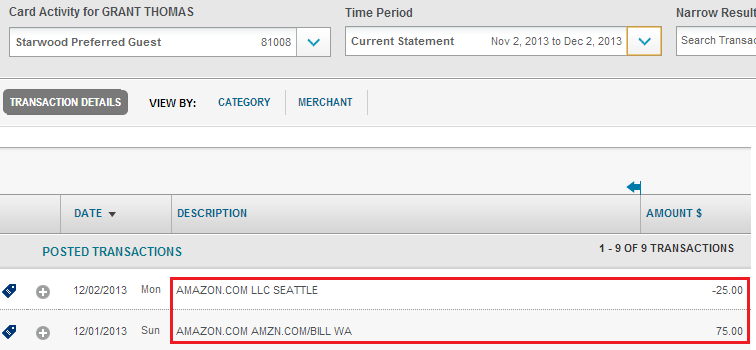
I know, I know, it is too late for this warning, but don’t be too greedy.  Like many of you, I enrolled 4 of my American Express credit cards in the $25 statement credit for $75+ Amazon purchases a few days ago.  After making 4 $75 egift card purchases on Amazon, I received my 4 $25 statement credits after 1-2 days.  Everything worked perfectly.  Thank you American Express.

Last night when I was looking at “My Offers” for my American Express credit cards, I saw that some of my credit cards showed the Amazon offer as redeemed:

Amazon Redeemed

While some of my credit cards showed the offer as available:

Amazon Available

Even though I had earned the $25 statement credit:

Amazon SPG Double Dip

Continue reading

Free Amazon Prime Membership for “Family Members”

Amazon Prime Free

Free Amazon Prime Membership for “Family Members”

(Thanks to Jeanette for emailing me and reminding me to write this post)

A few weeks ago, I searched on Ebay for the term “amazon prime” and was curious what I would find.  I encourage you to do the same, if you are interested.

Ebay Search

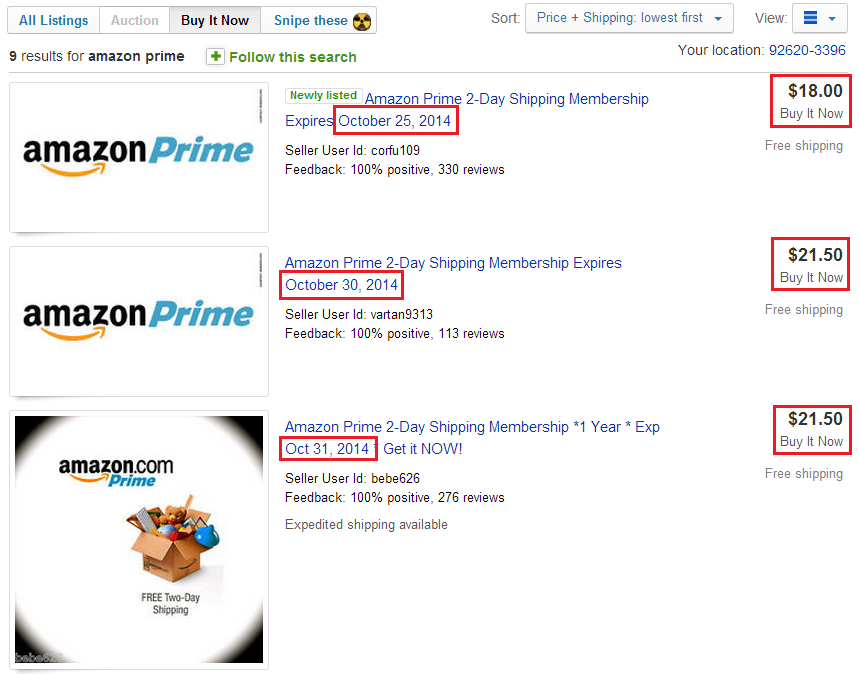
Here is what showed up when I searched today.  9 different items available for purchase, with prices from $18-$22 that came with Amazon Prime membership through October 2014.  Currently Amazon Prime costs $79 a year, so this is already a good deal.
Ebay Results

To read the entire post, please click here.

a close up of a logo

How to Get Free Amazon Prime Membership for “Family Members”

A few weeks ago, I searched on Ebay for the term “amazon prime” and was curious what I would find.  I encourage you to do the same, if you are interested.

Ebay Search

Here is what showed up when I searched today.  9 different items available for purchase, with prices from $18-$22 that came with Amazon Prime membership through October 2014.  Currently Amazon Prime costs $79 a year, so this is already a good deal.

Ebay Results

If you click on one of the listings, the item description will be similar to this:

Amazon Prime 1 Full year of Free 2 Day Shipping Benefits Only

This auction is a guest membership to Amazon Prime (you will be joining my account). You must already have an Amazon account of your own. You will have access to the FREE 2 day shipping. I will not have access to your account, and likewise, you will not have access to my account. I will not know your password, etc. Amazon lets the main Prime Account holder invite, 4 members to share part of their Prime perks.

My 1 year Prime Membership began on October 25, 2013 and you will access to Prime’s 2 day shipping until then. The sooner, you buy, the longer you will have access to free 2 day shipping.

Instant video and Kindle Owners Lending Library will NOT be available with this guest membership

Your Membership will end on 10/25/2014 ,Membership will end on this date no matter what date you purchased these benefits from me.

Your Amazon Prime Membership will be a guest membership sponsored by my Amazon account.

Only the 2 day shipping benefits are shared with guest memberships.  Instant video and Kindle Owners Lending Library will NOT be available with this guest membership.

After your payment has been received I will add you to my guest list as soon as possible.
During checkout please use the notes section on either eBay or Paypal to provide me with these details needed to set you up with free 2 day shipping

1 -Your Amazon email address – the email address you use for purchasing on Amazon.

2 – Your date of birth – month and day ONLY.

3- Your name.

4- All sales final!

You will need to have my information to confirm the membership in amazon – I will provide this to you after payment has cleared and I have set you up as a guest.

Please Review Amazon Prime Terms & Conditions For Further Information

So there you have it.  All you need to do is purchase this membership, provide your Amazon email address, birthday (day and month only), and your full name.  Pretty simple right?

If you read the description carefully, you should understand what the seller is selling.  Basically, he has an Amazon Prime membership in his Amazon account though October 25, 2014.  He paid the full $79 annual fee.  Amazon Prime allows you to “share” your Amazon Prime shipping benefits (no other Amazon Prime benefits included) with up to 4 “family members” for free.  To prove to Amazon that you are a “family member”, you must verify each other’s name and birthday.

Instead of paying some stranger on Ebay (we are all strangers until we become friends), you can do this yourself if you have a friend or relative that has an Amazon Prime membership.  Here’s how…

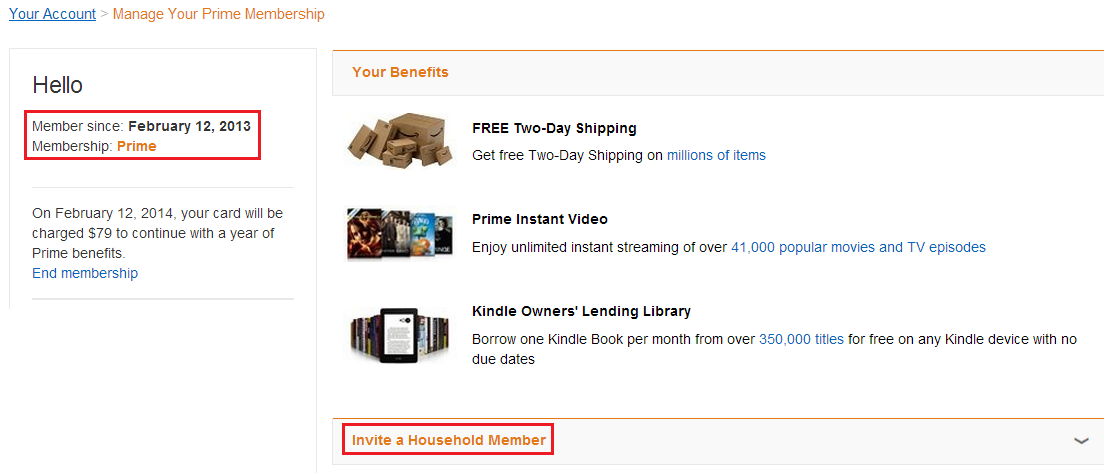
Log into your Amazon account and click on Manage Prime Membership under Account Settings.

My Amazon Account

From here, it shows the expiration date of your Amazon Prime membership (mine is from February 12, 2013 through February 12, 2014).  At the bottom, click the Invite a Household Member link.
Manage Amazon Prime Membership

From here, all you have to do is enter your “family member’s” name, email address, and birthday.  Does this information sound familiar (hint check above).
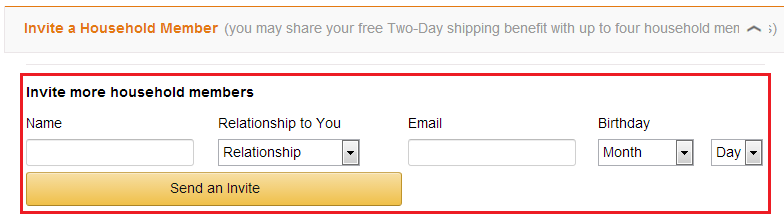
Enter Birthday

After you click Send an Invite, your “family member” will receive an email from Amazon.  They will need to enter your name and birthday to verify that they are your “family member”.  It’s really that simple.  The owner of Amazon Prime can always remove you from their “family” account, so that is something to worry about if you buy a membership from someone online.  All they need to do is click the Revoke button and you are no longer Amazon Prime, you are “Amazon Screwed.”
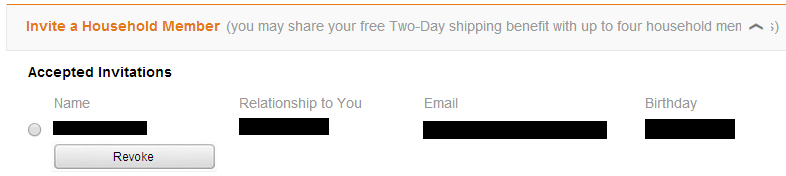
Revoke Amazon Prime

This is what it looks like from the other “family member’s” Amazon account.  You only get the Amazon Prime 2 Day Shipping option.  It also shows the expiration date of the Amazon Prime membership (February 12, 2014).
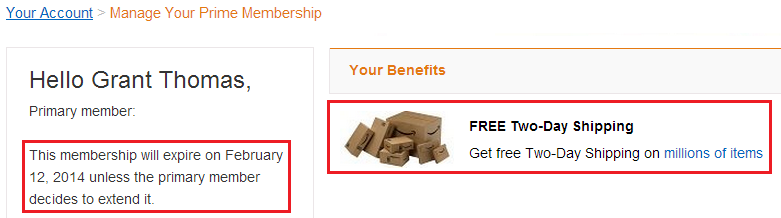
My Amazon Prime Membership

It is up to you, but I encourage you to use this responsibly with “family members” you have seen personally at birthday parties, over Thanksgiving dinner, and in family photographs.

If you have any questions, please leave a comment below.